Variable
This article explains the core concepts of C++ variables with real-life examples, answers "why we need C++ variables", details variable definition methods, type constraints, and naming rules, with complete code examples to help beginners master C++ variables quickly.
I. Explanation
C++ has two ways of operating on data: direct output types and "wrapped" types. Direct output types are the methods we learned earlier, such as the following:
- Numbers directly participating in calculations
#include<iostream>
using namespace std;
int main(){
	cout<<1+2<<endl; //3
	cout<<3-1<<endl; //2
	return 0;
}
- Outputting characters
#include<iostream>
using namespace std;
int main(){
	cout<<'a'<<endl; //a
	cout<<'b'<<endl; //b
	return 0;
}
- Outputting strings
#include<iostream>
using namespace std;
int main(){
	cout<<"hello"<<endl; //hello
	return 0;
}
In addition to the direct operations above, we can also use other methods, the most common being variables and constants.Using real-life examples, you can easily understand why variables are needed — essentially, they are "finding a 'container + name' for something to facilitate storage, retrieval, and modification." Without them, things would become chaotic and impossible to proceed:
Example 1: Grocery Shopping and Accounting (Storage + Reusing Data)
You go to the market to buy groceries:You buy apples (10 ), eggs (20 ), and greens (5 ), and need to calculate the total price.
- Without variables: You don’t remember anything, so when checking out, you have to say, "Boss, I bought something for 10 , something for 20 , and something for 5 — what’s the total?" If you buy 10 items, you can’t remember each price at all; you have to ask the boss one by one, and it’s easy to miscalculate.
- With variables: You take out your phone’s notes app (equivalent to memory) and "name + store values" (variables) for each item:
apple = 10,egg = 20,greens = 5Then calculate directly:apple + egg + greens = 35— you can check or add to it at any time. Even if you buy a bottle of soy sauce later (soy_sauce = 8), you just add it in without re-memorizing everything.
Here, "apple" and "egg" are variables, the notes app is memory, and variable names help you map "items" to "values" to avoid confusion.
Example 2: Adjusting Air Conditioner Temperature (Dynamically Modifying Data)
Your air conditioner is set to 26°C by default, and you feel hot and want to adjust it to 24°C:
- Without variables: The air conditioner has no "current temperature" container — it can only output 26°C fixed. You can never adjust the temperature; it’s either 26°C forever or turned off, with no flexibility at all.
- With variables: The air conditioner has a "current temperature" variable (e.g.,
temp = 26). When you press the "-" button, you changetempto 25, then to 24, and the air conditioner adjusts the airflow based on the latest value of this variable. This is the "modifiability" of variables, allowing things to respond to your actions.
Without this variable, the air conditioner is just a "fan with fixed temperature" and cannot interact.
Example 3: Picking Up a Parcel from a Locker (Memory Address + Variable Name)
You have a parcel in locker 102 of the community parcel locker:
- Without variables: The locker only tells you, "Your item is in locker 102." You have to remember "locker 102 = my parcel." If you have 10 parcels, you have to remember 10 locker numbers (005 = snacks, 018 = clothes, 036 = books…), and it’s easy to mix them up and take the wrong one.
- With variables: The locker attaches "name tags" (variable names) to items in each locker: locker 102 = snacks, locker 018 = clothes, locker 036 = books. You don’t need to remember locker numbers (memory addresses); you just look at the tags (variable names) to find what you want. Even if the snacks are moved to locker 205, the tag updates, and you still look for "snacks."
Variable names are "tags" that help you avoid complex "locker numbers" (memory addresses) and operate directly on "items."
Example 4: Sorting Items in a School Bag (Type Constraints)
You need to pack your school bag: textbooks go in the main compartment (large space), erasers in the pencil case (small slots), and water bottles in the side pocket (dedicated spot):
- Without variables: The school bag has no "divisions" (types). You stuff the water bottle into the pencil case (it won’t fit), throw textbooks into the side pocket (half hanging out), and everything is messy or even damaged — just like forcing an 8-byte float into 4-byte memory in a program, which causes a crash.
- With variables: Each division of the school bag is a "variable type": main compartment = for textbooks (large types like
int/long), pencil case = for erasers (small types likechar/short), side pocket = for water bottles (specific types likefloat). Each division only holds corresponding items, so nothing gets messed up. This is the "type constraint" of variables, ensuring "it fits and doesn’t get damaged."
Core Summary
"Containers + names" in real life (notes app entries, air conditioner temperature, parcel locker tags, school bag divisions) correspond to variables in programs. Without them, you can’t store, modify, or find things — you either forget, mess up, or can’t interact at all.Variables in programs are tools that help computers "store, modify, and use data in an organized way," just like how you need to "label things and find containers" in real life.
II. Variables
A variable is a quantity that can change. Its key feature is "loving the new and hating the old" (always holding the latest value).The use and value range of a variable are determined by its type. For common variable types and their value ranges, refer to the previous article: C++ Data Types In-Depth Guide: Definition and Use of Integer/Floating-Point/Constructed Types.The syntax for defining a variable is:basic
Data type specifier variable1, variable2, variable3......variablen;
For example:
int a,b;
The line above defines two integer variables named a and b with no initial values.For initializing variables (assigning an initial value), see the example below:
int a=1;
This example defines an integer variable a and initializes it to 1.A comprehensive example:
#include<iostream>
using namespace std;
int main(){
	int a; // Defines an integer variable a with no initial value
	int b,c=1; // Defines two integer variables b and c; c is initialized to 1
	double d=0.2; // Defines a floating-point variable d initialized to 0.2
	bool x=true; // Defines a bool variable x initialized to true
	char k='g'; // Defines a char variable k initialized to 'g'
	return 0;
}
To output the content above:
#include<iostream>
using namespace std;
int main(){
	int a; // Defines an integer variable a with no initial value
	int b,c=1; // Defines two integer variables b and c; c is initialized to 1
	double d=0.2; // Defines a floating-point variable d initialized to 0.2
	bool x=true; // Defines a bool variable x initialized to true
	char k='g'; // Defines a char variable k initialized to 'g'
	// Test output
	cout<<"a="<<a<<endl; // a=4254665 (random value because no initial value is assigned)
	cout<<"b="<<b<<",c="<<c<<endl;// b=0, c=1 (b has no initial value, so it’s randomly 0)
	cout<<"d="<<d<<endl;// d=0.2
	cout<<"x="<<x<<endl;// x=1 (bool true is represented as 1)
	cout<<"k="<<k<<endl;// k=g
	cout<<t<<endl; // Compilation error: 't' was not declared (not defined earlier)
	return 0;
}
Summary
- The data type specifier determines the type of data the variable stores. Choose based on actual needs (e.g.,
int,char,double, or constructed types likestruct). - Variables are usually defined at the beginning of a block/function. When defining multiple variables of the same type, separate them with commas and end the statement with a semicolon.
- Variables must be defined before use — using an undefined variable will cause an error.
- Variable naming has strict rules:(1) Can only contain letters (uppercase/lowercase), numbers, and underscores (
_).(2) Cannot start with a number.(3) Cannot be a keyword.
basic
【Explanation】What is a keyword?
In plain terms, a keyword in C++ is an "official dedicated word" defined by the programming language standard. Each keyword has a fixed meaning and purpose — it is an "instruction word" that the compiler understands.
You cannot use keywords as variable names or function names, just like you cannot misuse official terms (e.g., "account opening" or "transfer" at a bank) as custom names.
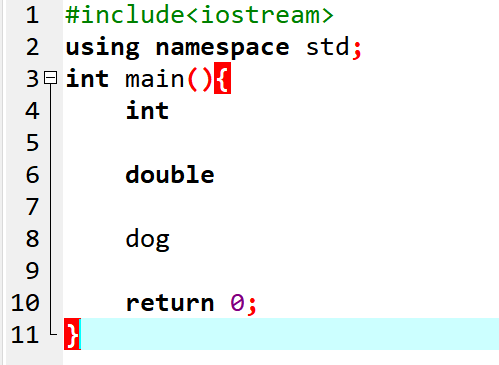
Common basic keywords: int, float, char, double, if, else, for, while, return, const, void, class, struct, bool, break, continue, static, new, delete, etc.
In DevC++, keywords are displayed in black. For example, int and double turn black, while dog (a custom name) does not.